Professional services
Need expert help? RAGcon GmbH offers:
- RAGflow Support
- RAGflow Hosting
- Moodle Support
RAGflow AI Provider
Repository & issue tracker
- Repository: https://github.com/ragcon-ai/moodle-aiprovider_ragflow
- Issues / bug tracker: https://github.com/ragcon-ai/moodle-aiprovider_ragflow/issues
Component: aiprovider_ragflow
Requires: Moodle 5.0–5.2
RAGflow: 0.25 or later
Depends on: — (root of the suite)
Deep document understanding
Answers and sources draw on the content of your documents — scanned pages, images and tables included, read by OCR, layout and vision models. See Document understanding.
The RAGflow AI provider plugs into Moodle's core AI subsystem and connects Moodle's text AI actions to an external RAGflow instance. Answers are produced by a RAGflow chat assistant over the OpenAI-compatible endpoint, so they are retrieval-augmented and based on the assistant's knowledge base rather than a plain LLM. It is also the shared backend of the whole suite: it runs the chat engine, session and long-term memory, source citations and a secure download proxy that the Tutor, Search and Helpdesk plugins use. Install and configure it first.
Easy setup
- Install and enable the provider
- Add a provider instance
- Set the base URL and API key
- Configure the actions you want
Features
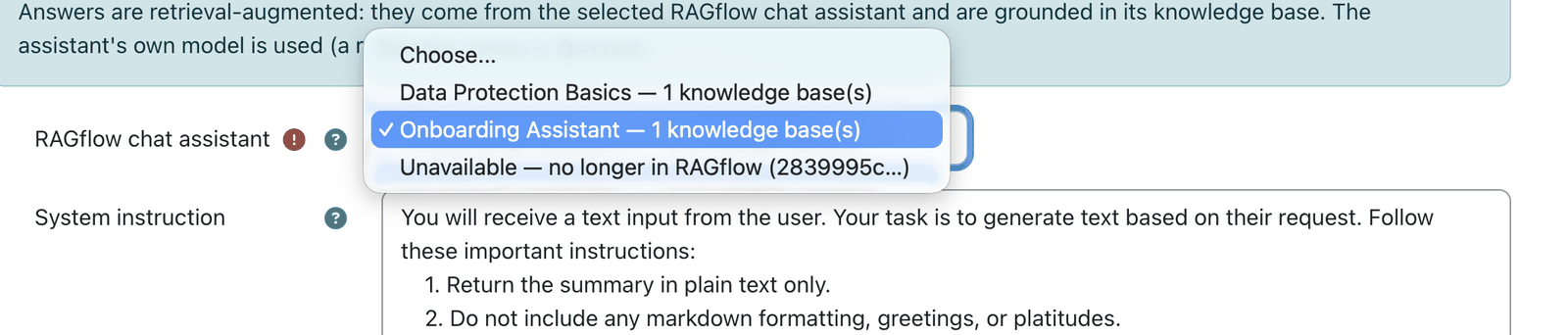 The assistant dropdown is fetched live and shows each assistant's document count.
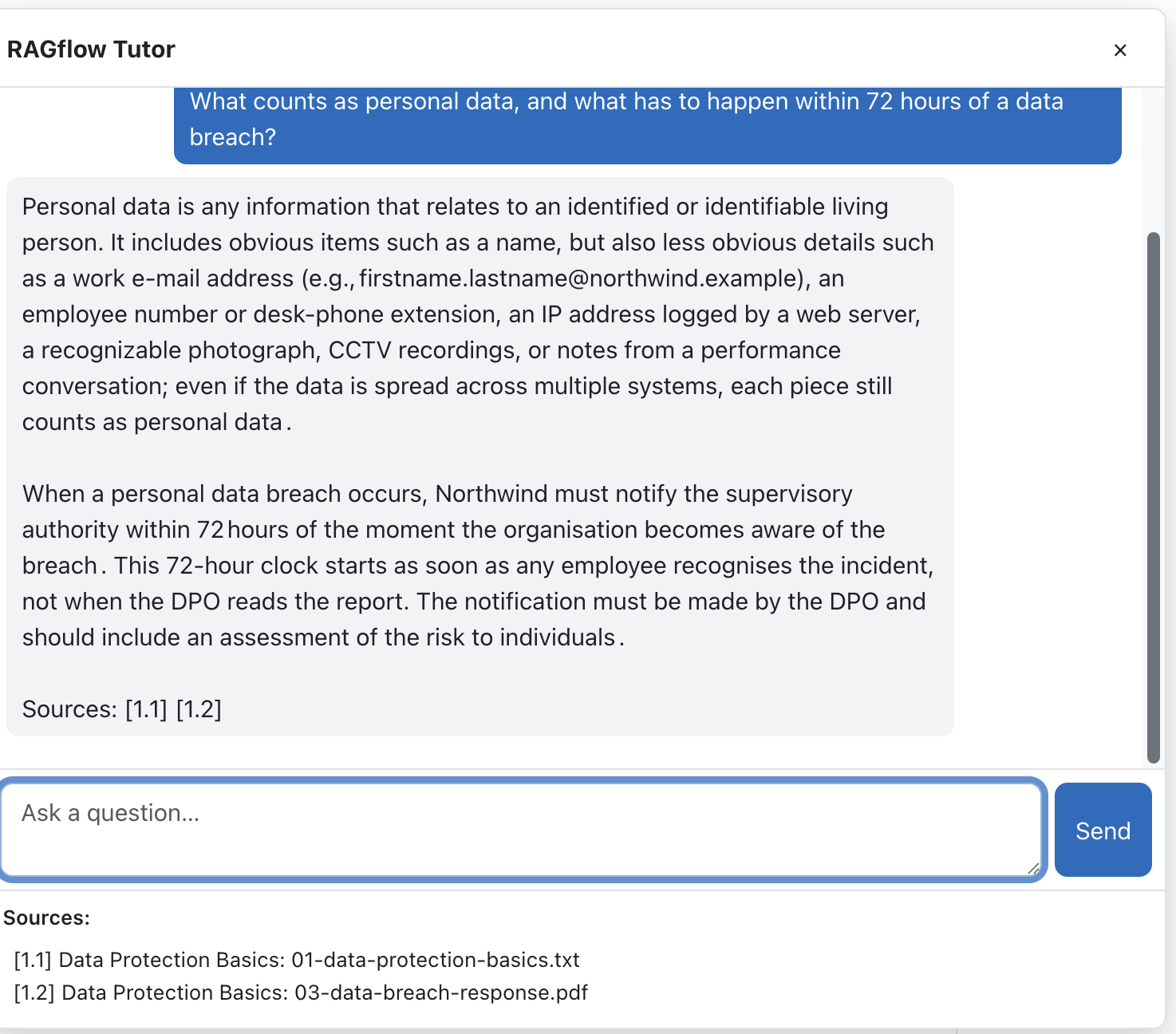 Citations come from the model's own [ID] markers and are numbered per answer.
- Core AI actions: serves
generate_text,summarise_text,explain_text, each answered by the configured RAGflow assistant. - Assistant-driven model: the assistant's own model and knowledge base are used; a live dropdown lists your RAGflow assistants and labels each with its knowledge-base document count (or "no knowledge base — LLM proxy only"), so you can pick a RAG assistant or use RAGflow as a plain LLM.
- Knowledge-base scoping & metadata filtering: answers can be filtered to this Moodle (course + site), the whole KB, or external/shared documents, and restricted to the current course or the user's enrolled courses via a document metadata field.
- Source citations: optionally returns the source documents behind an answer, built from the
model's own
[ID]citations (only the documents actually used). They are numbered per answer as[answer.source](e.g.[1.1],[2.1]), shown on aSources:line at the end of the answer and as a linked list — linking to the Moodle activity when known, otherwise through a secure proxy. - Secure download proxy (
download.php): streams a RAGflow document from the server, so the API key never reaches the browser. Links are signed and time-limited, created when you click, and only safe file types open in the browser (nosniff; anything but PDF, PNG, JPEG, GIF, WebP or plain text downloads as a file). - Conversation (session) memory: for the Helpdesk drawer, RAGflow keeps the conversation so follow-ups have context and the transcript is restored on return.
- Long-term memory: optional per-user durable facts via RAGflow's native Memory API (opt-in, off by default; disabled in private/incognito mode; cleared with the user's data).
- Answers in the user's Moodle language (profile or course-forced language).
- Per-user rate limiting (20 requests/minute) and reliable requests (120 s timeout, one retry on a network or 5xx error, not on 4xx).
- Clear failures: the real technical cause (HTTP status, RAGflow
{code, message}, embedding or context-window errors) is shown to permitted users and to the dashboard; a coarse error type is recorded for usage analytics. - Usage events (metrics only, no content):
chat_completed/chat_failed/search_performedfor the optional dashboard. - Scheduled task: Prune stale RAGflow conversation sessions (daily) removes sessions unused past the retention period (default 30 days).
Use cases
Three ways an institution runs the provider as its shared AI foundation — expand an example. Pair it with the RAGflow Moodle Connector, which feeds the courses' Moodle content into the RAGflow knowledge bases the provider serves and keeps them current automatically.
Enterprise — one governed AI backend
A company configures a single provider instance for the whole site: one base URL and API key to rotate, in one place, and the Tutor, Search and Helpdesk all run through it.
Per-action scoping keeps one department's documents from surfacing in another's answers, and the download proxy streams source files server-side so the API key never reaches the browser. IT sets it up once and governs it centrally.
Universities — standards-based, faculty-wide
A university connects Moodle's native AI subsystem to a single RAGflow instance (self-run or hosted by RAGcon), and every faculty's blocks and placements consume the same backend — answering in each user's Moodle language.
Because it sits on the core AI subsystem rather than beside it, administrators get the same enable/disable and logging surface as any other AI provider, and the integration stays aligned with Moodle's roadmap.
Public sector — data sovereignty & model choice
An authority points the provider at an on-premises RAGflow running local or EU-hosted models, so no learner or citizen data — and no source document — leaves its own infrastructure.
Every answer carries a citation for traceability, and the whole AI setup lives in one auditable configuration.
Configuration
The provider is configured as an AI-provider instance (Moodle's AI subsystem), plus per-action config. There is no classic settings page.
Provider instance — Site administration → AI → AI providers → RAGflow API provider
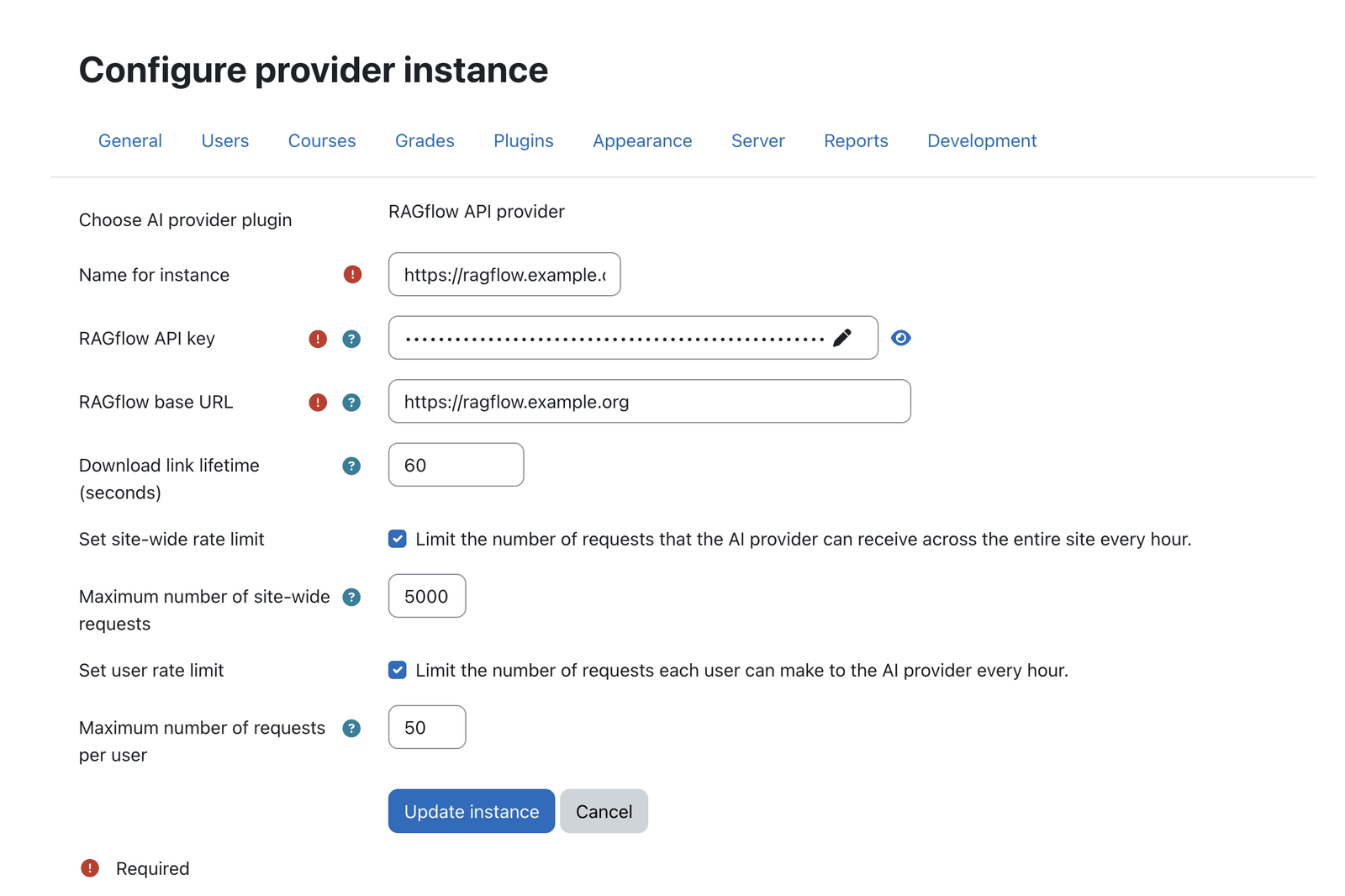 The provider instance holds the API key, base URL and download-link lifetime.
| Setting | Type | Default | Meaning |
|---|---|---|---|
RAGflow API key (apikey) |
password (required) | — | Your RAGflow API key (RAGflow → User settings → API). Sent as the Bearer token and used to list assistants. |
RAGflow base URL (baseurl) |
URL (required) | — | Base URL of your RAGflow instance, e.g. https://ragflow.example.com. |
Download link lifetime (seconds) (tokenttl) |
integer | 60 (min 15) |
How long a signed source/file download link stays valid. Links are minted on click, so a short lifetime is safe. |
The provider counts as configured only when both API key and base URL are set.
Per-action config — per Generate / Summarise / Explain text action
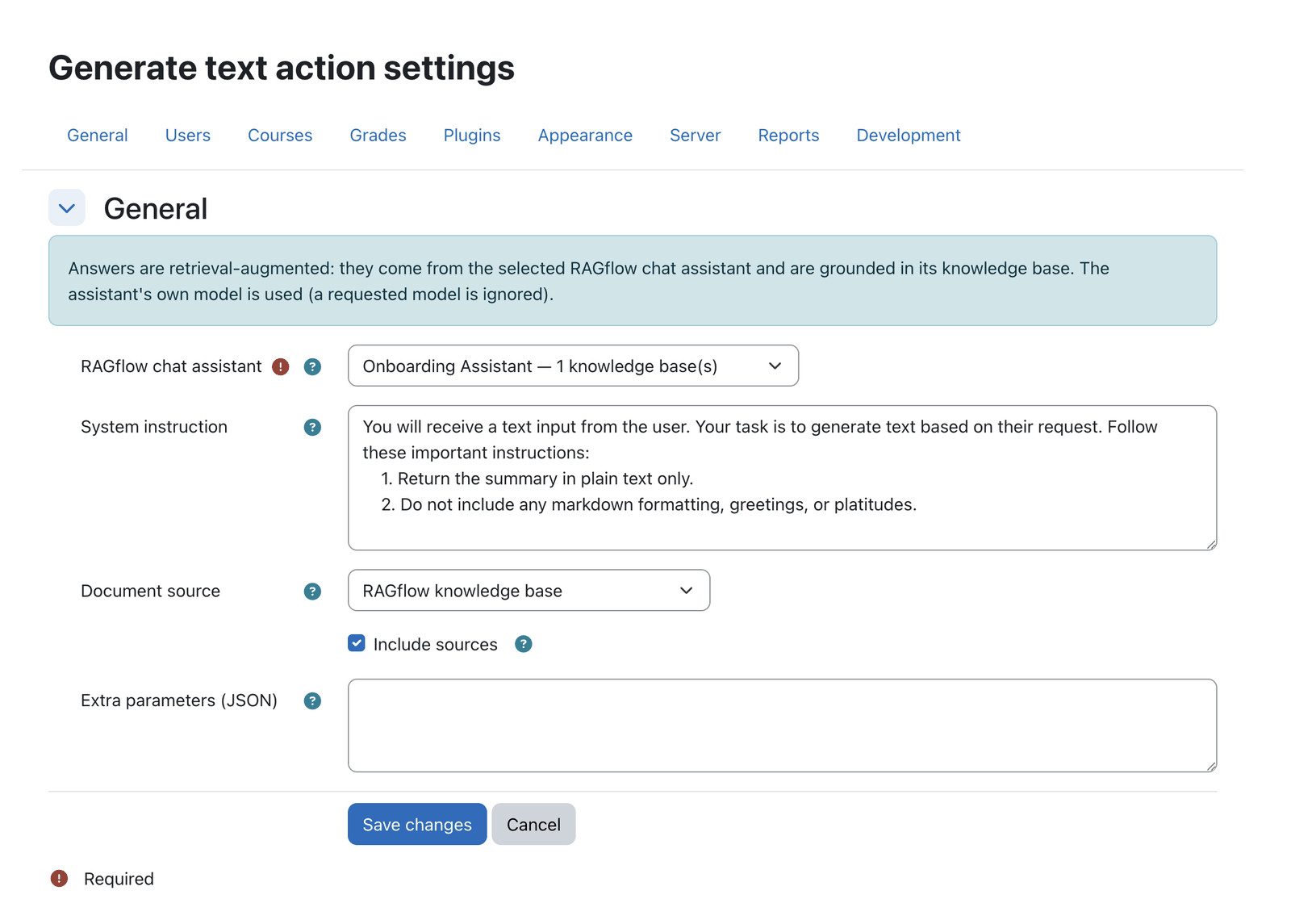 Per-action configuration: assistant, system instruction, document source and scope.
| Setting | Type | Default | Meaning |
|---|---|---|---|
RAGflow chat assistant (chatid) |
select (live) / text (required) | — | The assistant to answer with. Its model and knowledge base(s) are used. Pick a KB assistant for RAG, or a KB-less one to use RAGflow as a plain LLM. |
System instruction (systeminstruction) |
textarea | action default | Instructions prepended as a system message to steer the response. |
Document source (datasource) |
select | thismoodle |
wholekb — RAGflow knowledge base (no filter); thismoodle — This Moodle via Moodle Connector (filter: course + site); or external — External Moodle via Moodle Connector (shared documents only). The two Moodle Connector sources require RAGflow's built-in Moodle connector to have written that metadata. |
Restrict to course(s) (coursescope) |
select | off | Current course or The user's enrolled courses. Hidden for whole KB / external. |
Course metadata field (coursemetadatafield) |
text | course_id |
RAGflow document metadata field holding the Moodle course id. |
Include sources (includesources) |
checkbox | off | Return source documents and append them as a linked list. |
Extra parameters (JSON) (modelextraparams) |
textarea | empty | Optional JSON merged into the request body (e.g. {"extra_body": {"reference": true}}). Validated as JSON. |
Where the chat/drawer settings live
The Tutor block and Helpdesk placement each carry their own copy of the chat settings (assistant, greeting, memory, sources, …) — configured on those plugins, not here — while the provider hosts the shared engine that reads them. See the Tutor and Helpdesk pages.
Capabilities
| Capability | Default roles | Purpose |
|---|---|---|
aiprovider/ragflow:viewerrordetails |
Manager, Editing teacher (site admins always) | See the technical cause of a failed chat (a Details disclosure). The cause can reveal server-side internals (e.g. a RAGflow embedding error or HTTP 502), so it is withheld from ordinary users — enforced server-side, RISK_CONFIG. |
Roles & permissions (who can do what)
The provider has no interface of its own. It is the backend for the Tutor, Helpdesk and Search plugins, each of which enforces its own permissions. Only two things are governed here: who configures the connection and who sees the technical cause of a failed request.
| Role | What this role can do |
|---|---|
| Site administrator | Full control: create / configure the RAGflow provider instance (URL, API key, models, rate limits) under Site administration → AI → AI providers, enable it for the AI actions, and see the Details cause of a failed chat everywhere. |
| Manager | Sees the technical Details of a failed chat (:viewerrordetails). Does not configure the provider (that is a site-admin area) unless separately granted moodle/site:config. |
| Teacher (editing) | Sees the Details of a failed chat in their course. |
| Non-editing teacher · Student · any authenticated user | Use the AI features built on the provider, following each plugin's own rules. On a failure they see only a generic message; the technical cause is not shown. |
| Guest / not logged in | No access. |
Privacy
By default the plugin stores no personal data in Moodle. Prompts (and, with long-term memory on,
the ongoing conversation and remembered facts) are sent to and stored in RAGflow (a third-party
processor). A small local table references RAGflow conversation sessions for the Helpdesk memory.
On user deletion, the plugin deletes those sessions and forgets the user's RAGflow memory. Users
can self-disable long-term memory via private/incognito mode in the chat; that choice is stored as
a per-user Moodle preference (aiprovider_ragflow_privatemode) and is exported and deleted with the
user's data.
See also: Moodle version specifics for public/ layout and
version-guarded error handling.
Note: This documentation was created with the help of AI. Spotted an error, an omission, or something unclear? Please report it in the ragcon-docs GitHub repository so we can fix it.