Professional services
Need expert help? RAGcon GmbH offers:
- RAGflow Support
- RAGflow Hosting
- Moodle Support
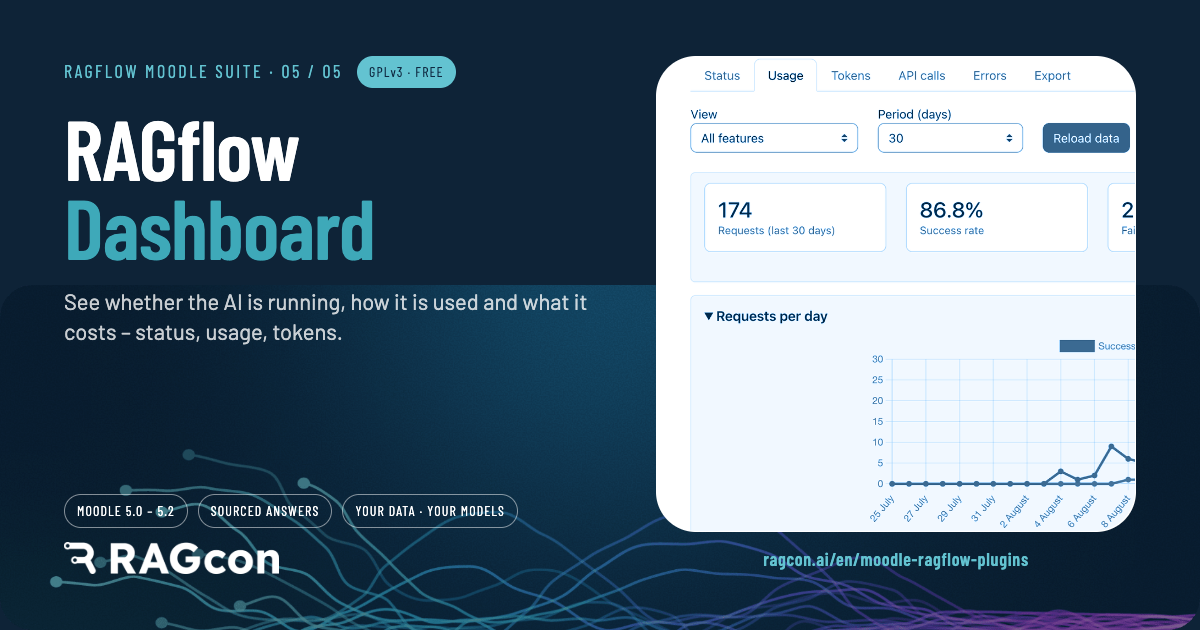
RAGflow Dashboard
Repository & issue tracker
- Repository: https://github.com/ragcon-ai/moodle-local_ragflowdashboard
- Issues / bug tracker: https://github.com/ragcon-ai/moodle-local_ragflowdashboard/issues
- The value at scale: Usage dashboard — value at scale
Component: local_ragflowdashboard
Requires: Moodle 5.0–5.2
Depends on: aiprovider_ragflow
An admin-only, tabbed report that shows how the suite is used: status and health, request
volume, token consumption, raw API calls and error breakdowns, plus an optional per-feature debug
capture for diagnosis. It is optional: the Tutor, Search, Helpdesk and provider plugins run without it. It records the provider's usage separately, so it is entirely
optional and does no harm if it is not installed. It also ships rfdsource_* sub-plugins that give each
feature its own status checks and analytics.
Easy setup
- Install the RAGflow AI provider first
- Install the Usage dashboard
- Open it under Reports → RAGflow Dashboard
- Enable the raw API log if needed
Features
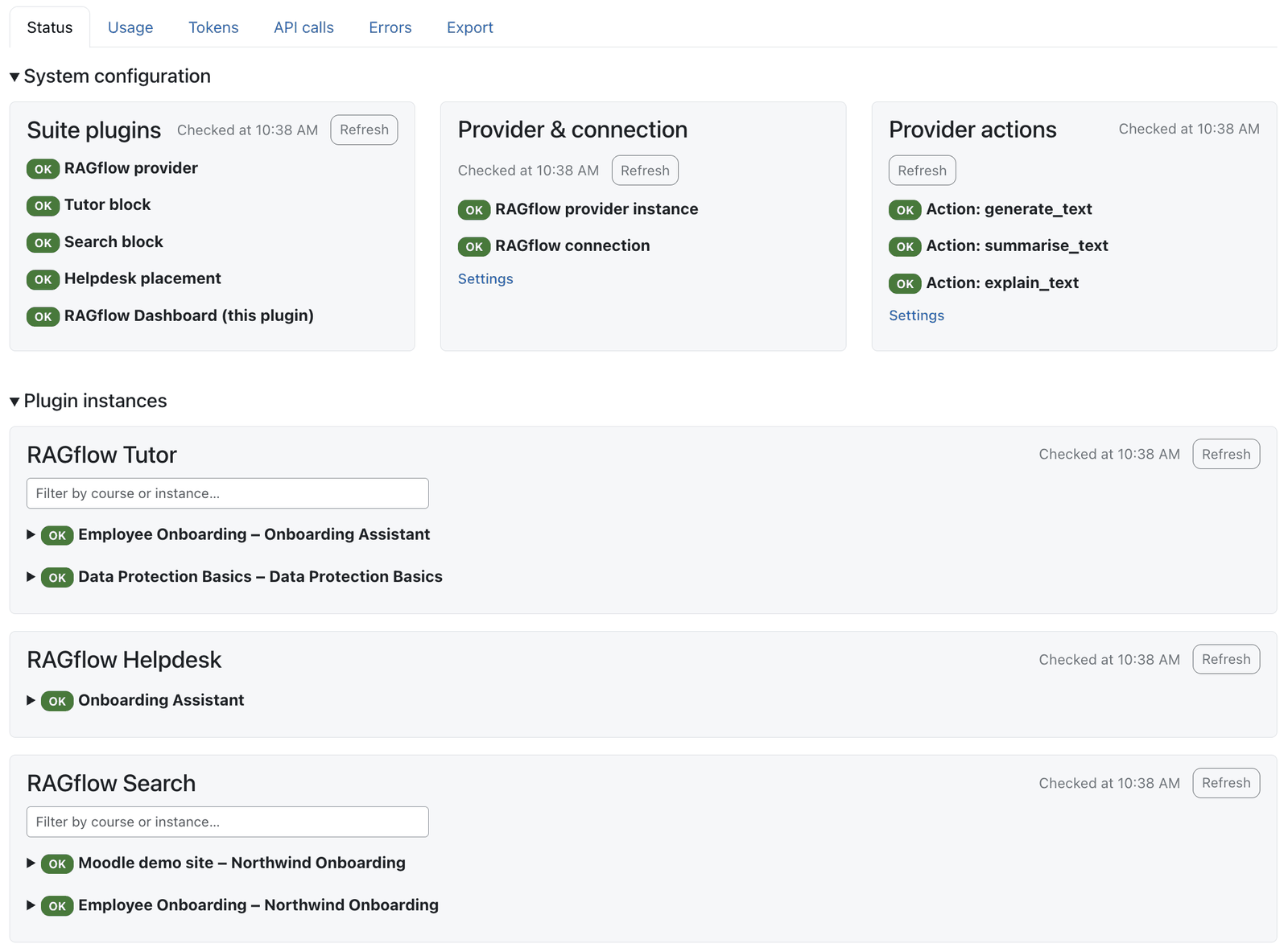 The Status tab: System configuration and the per-instance plugin section, each with its own health.
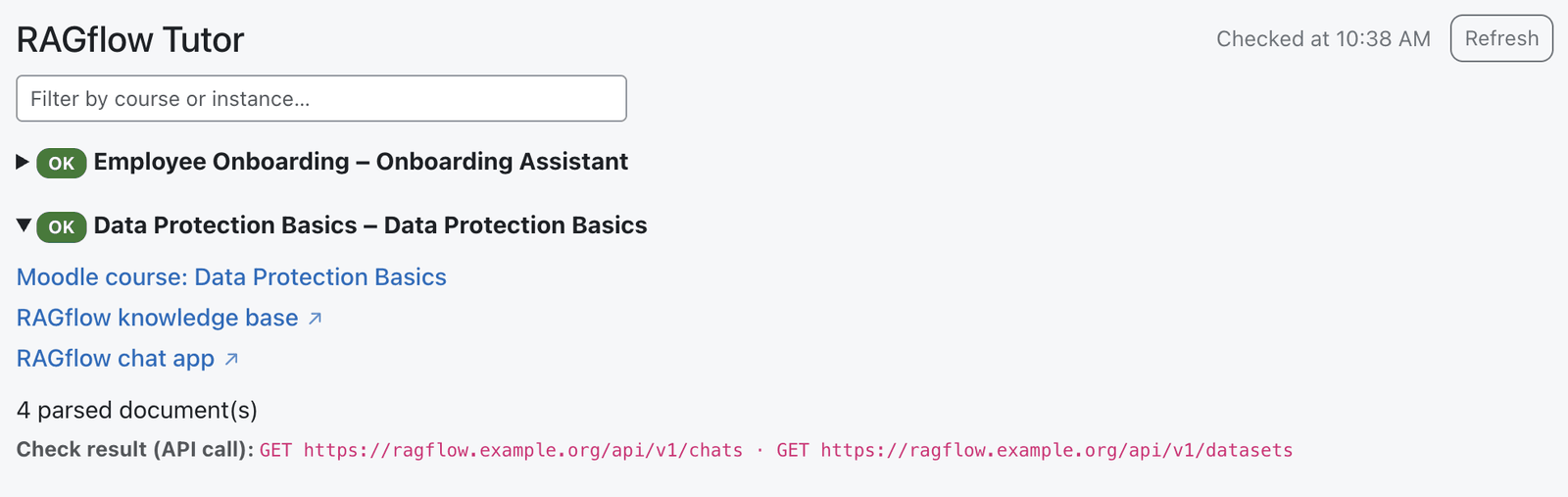 An opened instance links to its Moodle course and to the RAGflow knowledge base and chat app.
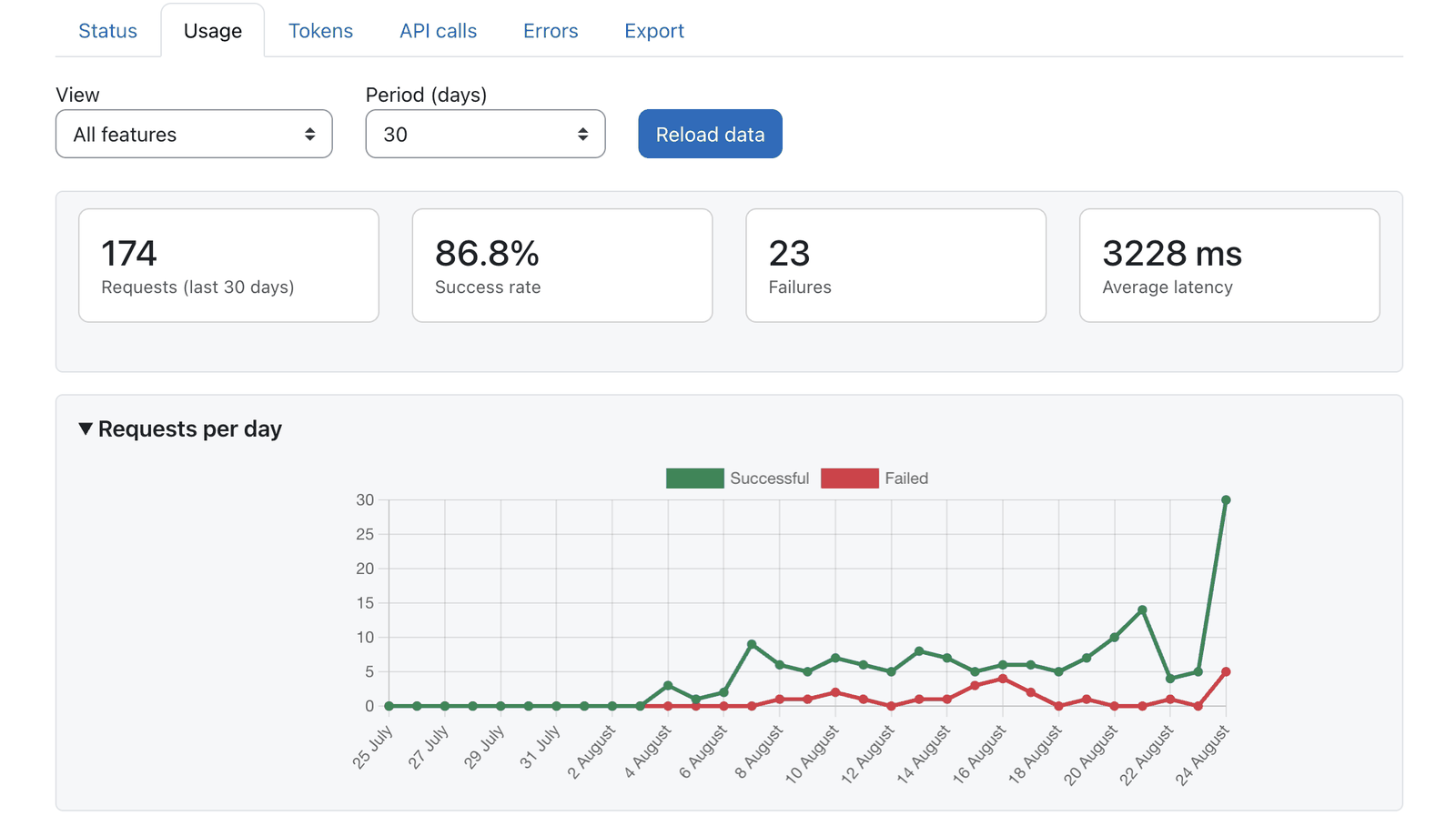 KPI cards and requests per day, split into successful and failed.
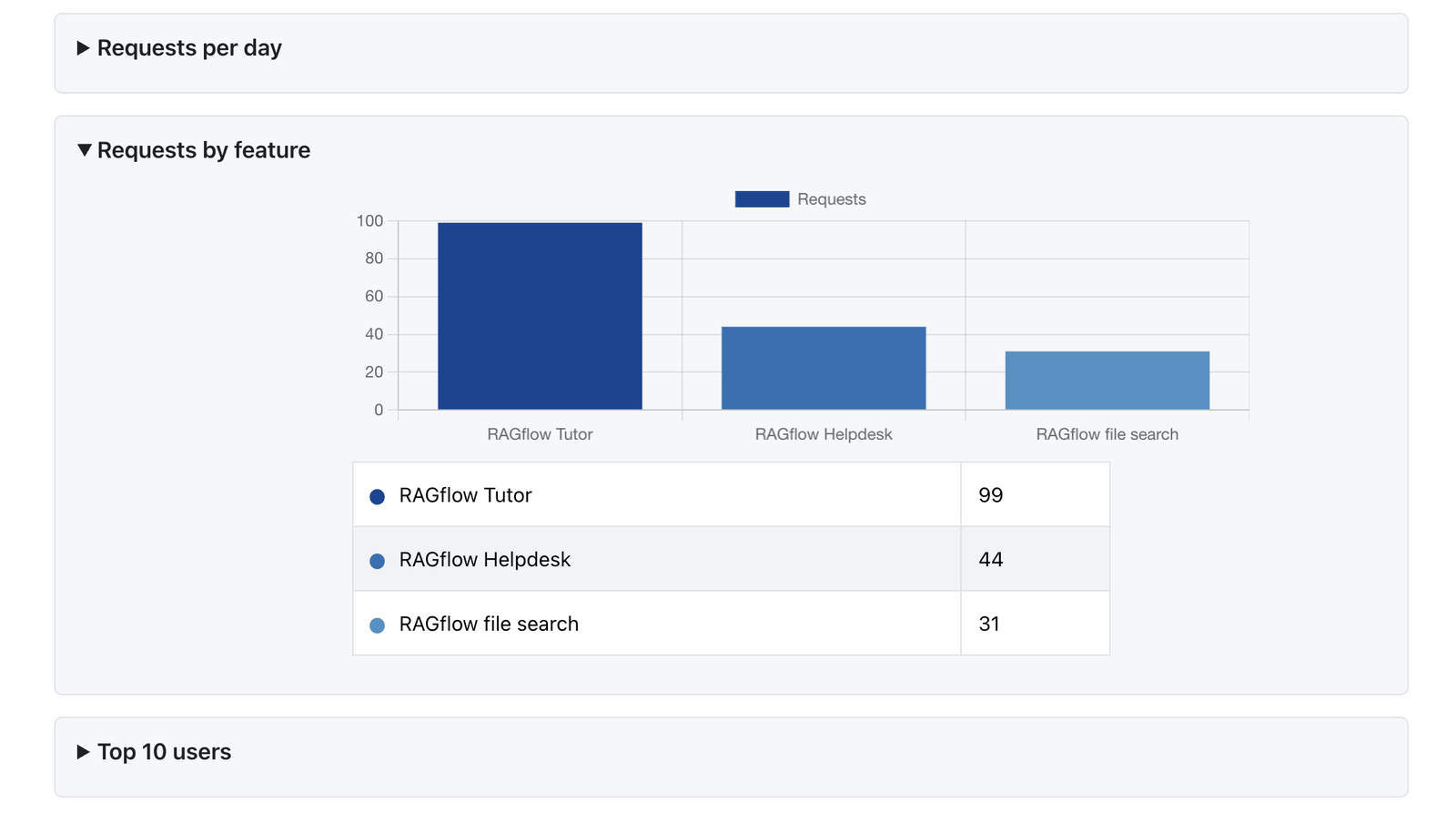 Requests by feature, top users, user group and course.
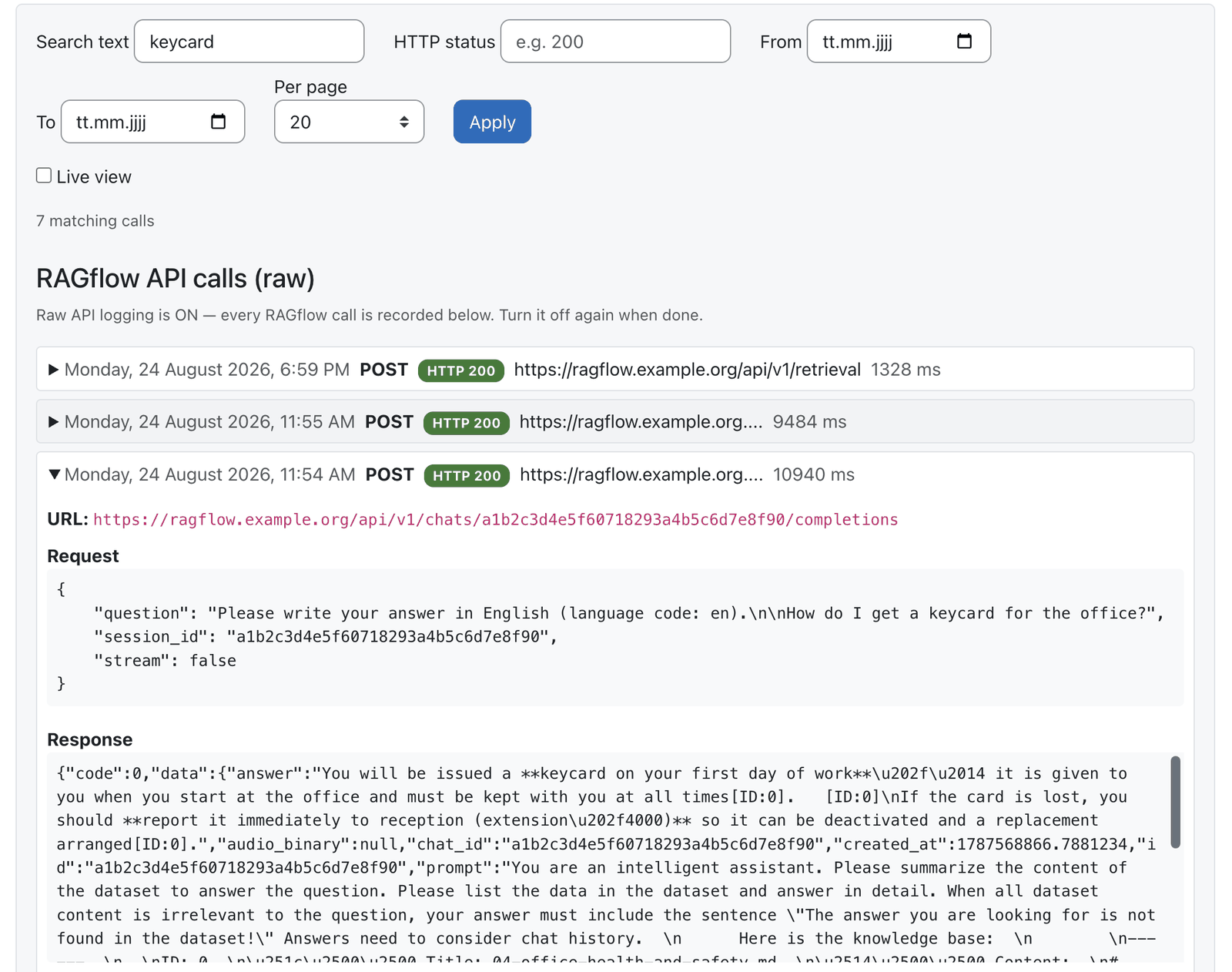 The raw API-call log with filters — the API key is never logged.
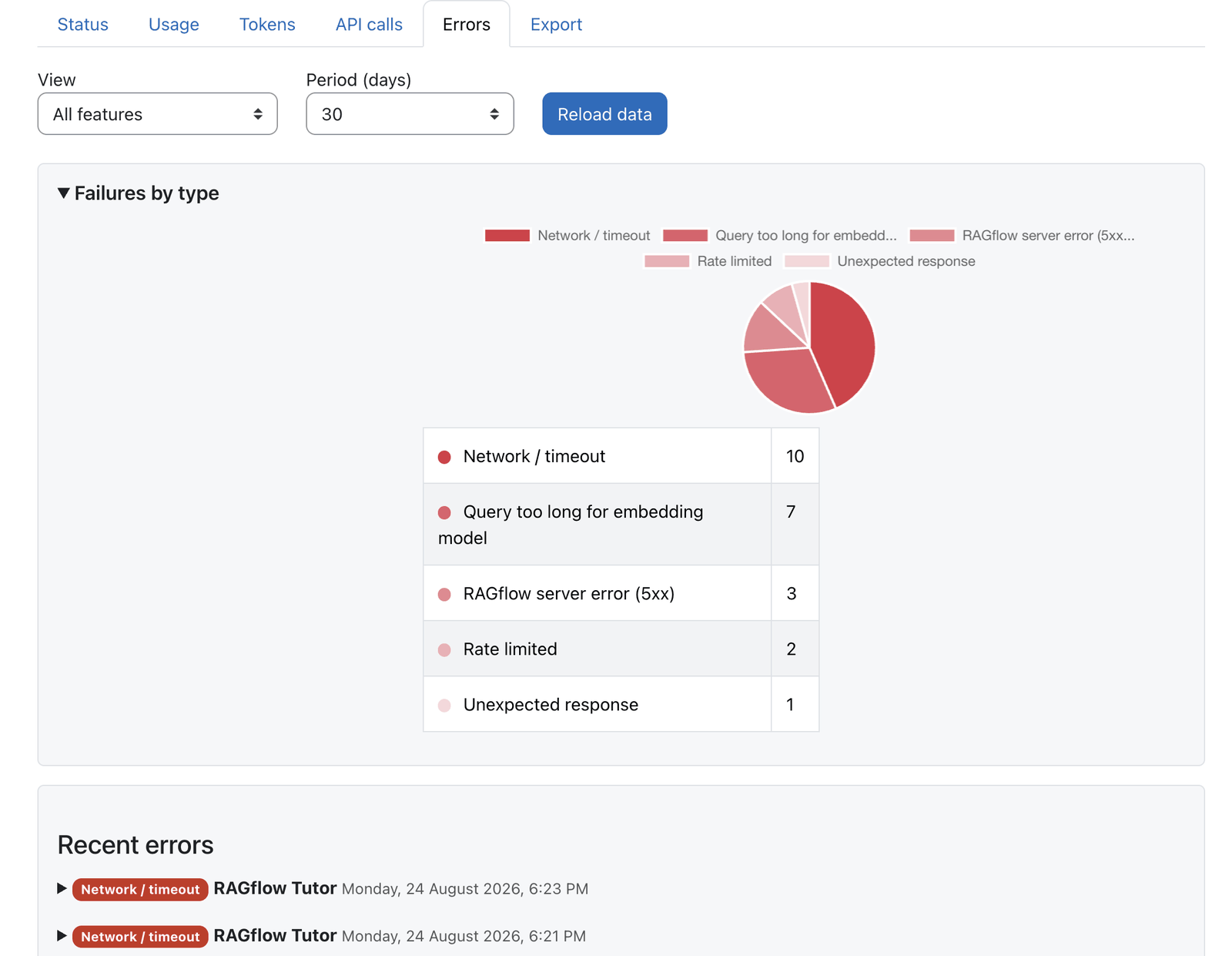 Failures grouped by labelled error type, with a recent-errors list.
 Export the usage log (metrics only) for a date range.
The report opens at Site administration → Reports → RAGflow Dashboard and is organised into tabs. A view selector (All features + one per installed source) and a period selector (today / 2 / 3 / 7 / 14 / 30 / 90 days, default today) filter the analytics tabs; controls reload over AJAX. Charts use Moodle's built-in Chart API with a consistent palette (green = success, red = errors, blue for neutral counts) and a colour-coded data table (a swatch per row) under each categorical chart.
- Status: is the provider configured and reachable, and is each configured reference correctly
linked? Organised into two collapsible sections:
- System configuration — three boxes side by side (stacked on narrow screens): Suite plugins (which of the five are installed — shown even when RAGflow is unreachable, no API call needed), Provider & connection (is the provider configured, and does a probe reach RAGflow?) and Provider actions (for each configured core_ai action — generate / summarise / explain text — the health of the assistant it uses). These are plain checks: a message appears only when something is not OK, and a single Settings link leads to the relevant admin page — no API-call proof line here.
- Plugin instances — one entry per Tutor / Search / Helpdesk instance, titled "Course – instance" (the RAGflow assistant or knowledge-base name; no link in the title). Opening an entry reveals a link to the Moodle course plus clearly-marked links to the RAGflow knowledge base and RAGflow chat app (these open RAGflow in a new window), the parse status (e.g. 4 parsed documents), and — for privileged viewers — the concrete API call used as proof. Tutor and Search add an instant, client-side filter over course and instance name. Every reference verdict comes from one shared check and is shown as a traffic light with five states: OK (green), degraded (amber — usable but e.g. the knowledge base has no documents yet or is not parsed), missing (red — the assistant/knowledge base was deleted in RAGflow), could not be verified (amber — RAGflow was unreachable, so this is a connection problem, not a configuration fault) and not configured (a blue notice — nothing set up yet). Missing and could not be verified are never conflated; red is reserved for genuine faults. A per-area Refresh re-runs just that box and refreshes the shared result for the other areas too.
- Usage: KPI cards (Requests, Success rate, Failures, Average latency), requests per day (successful vs failed), requests by feature, Top 10 users, requests by user group (trainers vs. students/users) and by course. Sections are collapsible: one open at a time, remembered across view/period changes.
- Tokens: chat token consumption (prompt / completion / total) as KPIs, per day, by plugin and by provider instance. See What is counted below.
- API calls: the raw RAGflow API-call log (one collapsible row per call) with a per-page selector (10 / 20 / 50), paging, a live auto-reload and filters (HTTP status, free text, date range). Off unless the raw-API-log toggle is on; the API key is never logged.
- Errors: failures by error type (labelled, e.g. RAGflow server error (5xx), Query too long for embedding model, Rate limited) and a collapsible recent-errors list.
- Export: download the usage log (metrics only) for a date range as CSV (default), XML or PDF. The export covers all views in one file: rows are labelled with the view (source) that owns them and grouped by view — a View column in CSV/XML, one section per view in the PDF (with a KPI summary). The acting user resolves to a name, or a dash when anonymisation is on.
Other: a usage log — metrics only (no message content, safe for the standard log store); an optional per-feature debug capture (bounded request/response, admin-only, only while enabled); a daily retention/purge task; and an anonymisation option (rows without a user link, aggregate stats still work).
Use cases
Three ways admins use the dashboard as the suite's operations layer — expand an example. The business case in depth is on the value at scale page.
Enterprise — cost control & chargeback
An operations team tracks token consumption per plugin, per provider instance and by top users — enough to set a budget, spot a runaway course early, and attribute cost to the department that owns it.
Any date range exports to CSV or PDF for chargeback, and the KPIs show at a glance that the AI is actually being used before the rollout expands.
Universities — adoption evidence & oversight
A learning-technology team shows requests by feature, course and user group (trainers vs. students) and the success rate over time — the evidence a rollout committee needs to justify and steer it.
The Status tab catches a course knowledge base that has stopped parsing, or an assistant deleted in RAGflow, before a student reports that the tutor "found nothing".
Public sector — accountability without storing content
An authority needs oversight its data-protection officer can sign off: the log holds metrics only — no message content — with an anonymisation option and a daily retention/purge task, and reports export to CSV, XML or PDF for the record.
The Status tab tells misconfigured apart from RAGflow unreachable, so an audit sees a genuine fault, not a network blip.
What is counted (tokens)
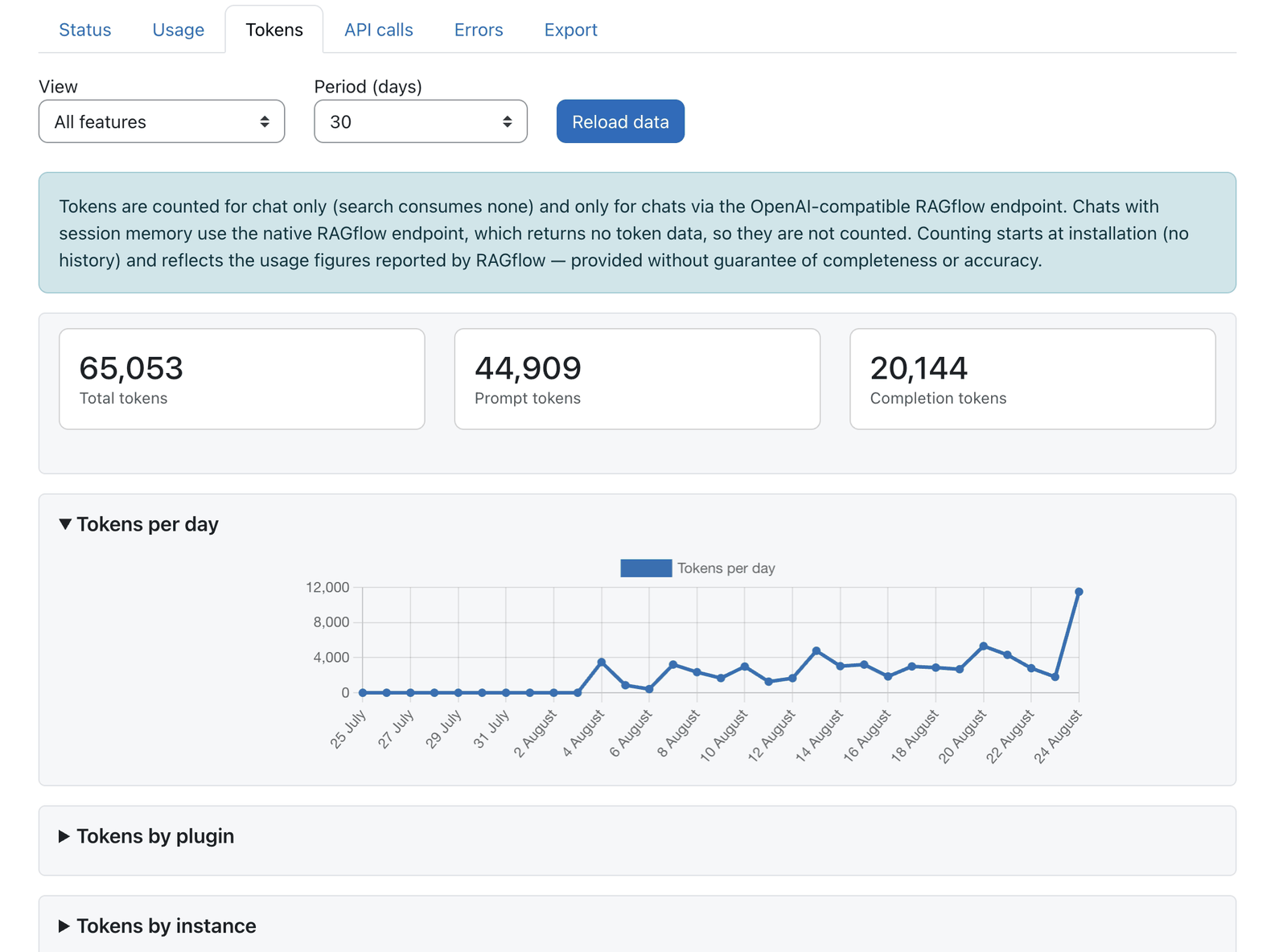 Token consumption per day, by plugin and by provider instance.
Token accounting — scope and no guarantee
Tokens are counted for chat only (search consumes none) and only for chats that use RAGflow's OpenAI-compatible endpoint. Chats with session memory use RAGflow's native endpoint, which returns no token data, so those turns are not counted. Counting starts at installation (there is no history), and the figures reflect what RAGflow reports — provided without guarantee of completeness or accuracy.
Configuration
Admin settings — Site administration → Plugins → Local plugins → RAGflow Dashboard settings
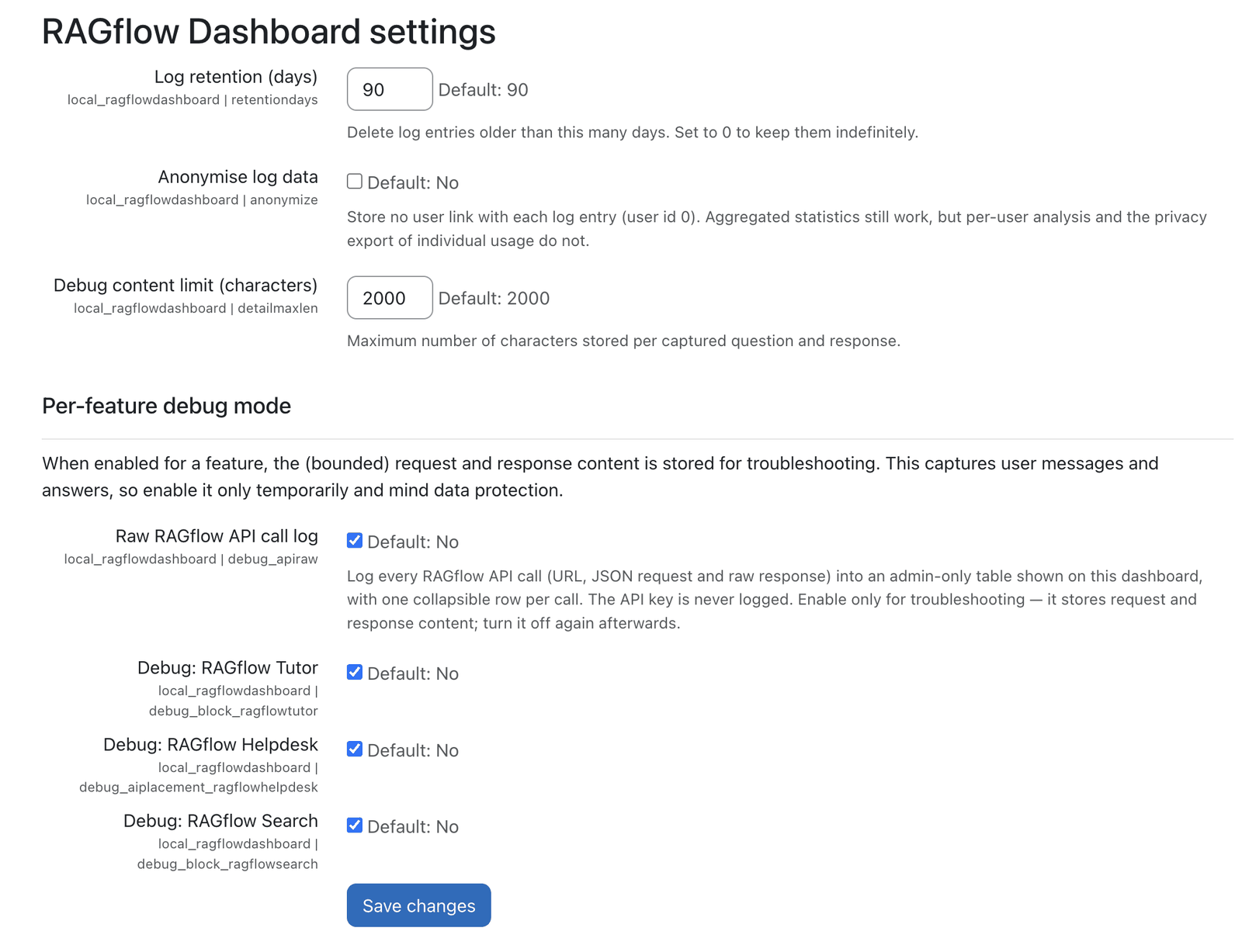 Retention, anonymisation and the per-feature debug toggles.
| Setting | Type | Default | Meaning |
|---|---|---|---|
Log retention (days) (retentiondays) |
integer | 90 |
Delete log entries older than this many days. 0 = keep indefinitely. |
Anonymise log data (anonymize) |
checkbox | off | Store no user link (user id 0). Aggregate stats still work; per-user analysis / privacy export do not. |
Debug content limit (characters) (detailmaxlen) |
integer | 2000 |
Max characters stored per captured question and response. |
| Per-feature debug mode (heading) | — | — | When enabled for a feature, the (bounded) request/response content is stored for troubleshooting — this captures user messages and answers, so enable only temporarily and mind data protection. |
Debug: {feature} (debug_<component>) |
checkbox | off | One toggle per feature owned by an installed source (Tutor / Helpdesk / Search, and any future rfdsource_*). When on, that feature's request/response content is captured. |
Raw RAGflow API call log (debug_apiraw) |
checkbox | off | Log every RAGflow API call (URL, request, response, status, duration) — this powers the API calls tab. The API key is never stored. Verbose; enable only for diagnosis. |
Capabilities
| Capability | Default roles | Purpose |
|---|---|---|
local/ragflowdashboard:view |
Manager (admin report) | View the dashboard, logs, debug captures and export. Intentionally not granted to teaching roles, since the data reveals usage patterns. |
Roles & permissions (who can do what)
| Role | What this role can do |
|---|---|
| Site administrator · Manager | View the dashboard: KPIs, charts, logs, debug captures and export (:view). |
| Teacher (editing & non-editing) · Student | No access by default: the usage data reveals usage patterns, so it is intentionally not granted to any teaching or learning role. |
| Guest / not logged in | No access. |
Grant local/ragflowdashboard:view to another role only if you deliberately want it to see site-wide
usage data.
Data model
local_ragflowdashboard_log: one row per request, metrics only: time, component, action, user id, course id, context id, success, error type, latency (ms), item count, the provider instance id and the chat token counts (prompt / completion / total). Never stores message content.local_ragflowdashboard_debug: request/response content (question + response), written only while a feature's debug toggle is on, truncated to the debug content limit. Written directly, so content never reaches the standard log store.local_ragflowdashboard_apilog: the raw RAGflow API-call log (URL, JSON request, raw response, status, duration), written only while the raw-API-log toggle is on. The API key is never stored.
Sub-plugins (rfdsource_*)
Each RAGflow feature contributes a dashboard section as a sub-plugin, shipped inside the dashboard
package: RAGflow Tutor (rfdsource_tutor), RAGflow Helpdesk (rfdsource_helpdesk), RAGflow
Search (rfdsource_search). Installing another rfdsource_* adds its section and debug toggle
automatically.
Availability & support
- Install it like any other Moodle plugin (Site administration → Plugins → Install plugins), then open it at Site administration → Reports → RAGflow Dashboard.
- Licence: GPLv3, like the rest of the suite.
- Support & bug reports: the issue tracker.
Privacy
The dashboard stores usage metrics and (only while debug is enabled) bounded request/response content, with full privacy export/deletion support. With anonymise on, rows carry no user link. Retention purges old rows automatically.
Note: This documentation was created with the help of AI. Spotted an error, an omission, or something unclear? Please report it in the ragcon-docs GitHub repository so we can fix it.