Professional services
Need expert help? RAGcon GmbH offers:
- RAGflow Support
- RAGflow Hosting
- Moodle Support
Set up the connector
Two things are needed: a Moodle web-service token for the connector to read with, and a data source in RAGflow that uses it.
Easy setup
Prerequisites
- A Moodle site (admin access to create a web service + token).
- A RAGflow instance with the Moodle connector (it ships with RAGflow).
- A user account in Moodle that is enrolled in the courses you want to sync. The connector sees exactly what this user sees — no more, no less.
1. Enable web services in Moodle
Site administration → Advanced features → enable Enable web services. Then Site administration → Server → Web services → Manage protocols → enable REST.
2. The web-service token
Create a token that can read course contents and download files.
- Define (or reuse) an external service that exposes the functions the connector calls:
Site administration → Server → Web services → External services → add a service, then add these
functions to it:
core_webservice_get_site_infocore_course_get_coursescore_course_get_contentsmod_forum_get_forum_discussions
- In the service's own settings, tick Can download files. Reading a course's contents and downloading its files are two separate permissions in Moodle; without this the connector sees the resource activities but cannot fetch the files behind them.
- Create the token: Site administration → Server → Web services → Manage tokens → Create token for the intended user on that service.
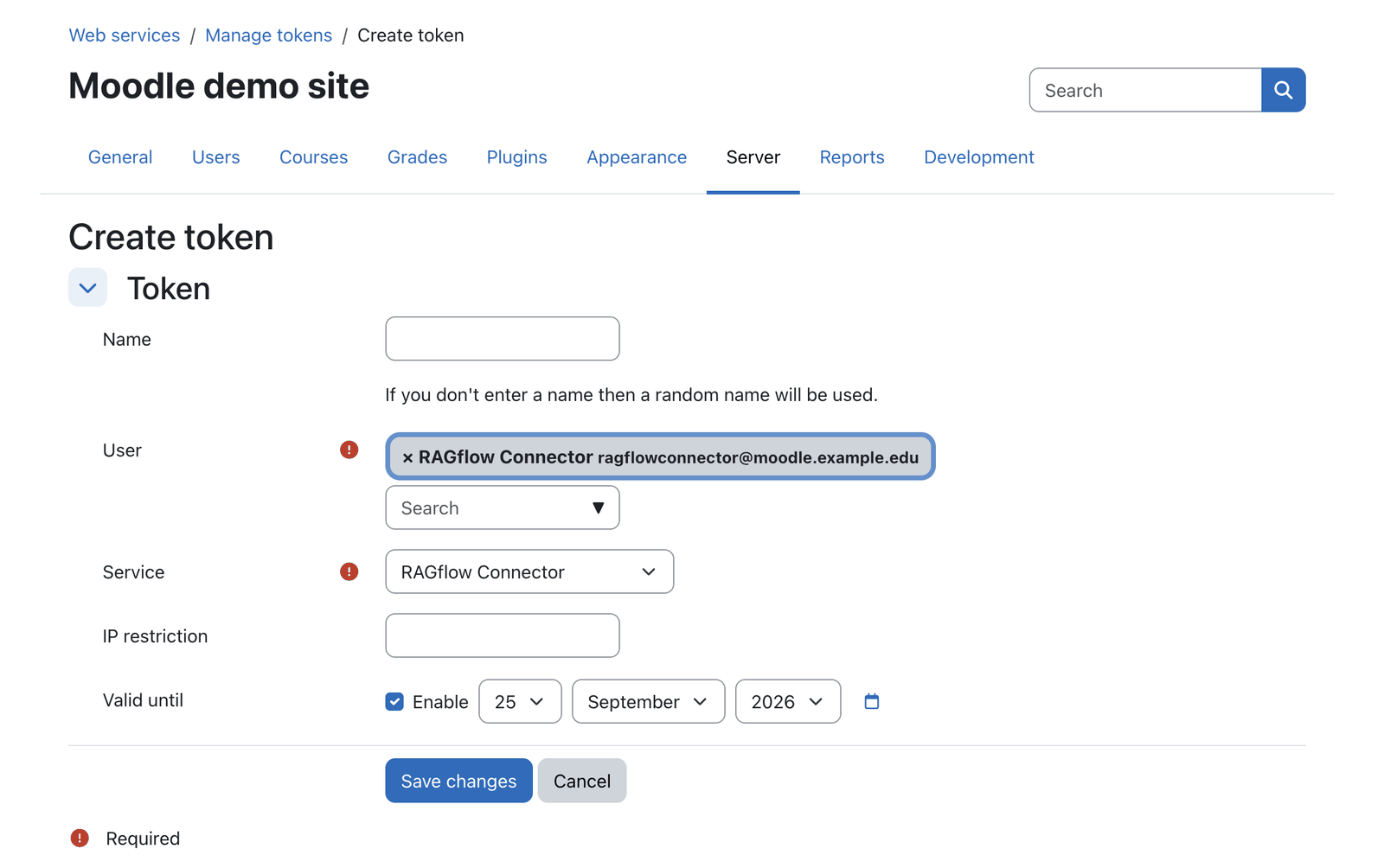 Create a web-service token in Moodle for a user enrolled in the courses to sync.
The token acts as its user
The connector reads with this user's permissions and only sees the user's enrolled courses. Give it a dedicated account enrolled (e.g. as a non-editing teacher) in the courses to index, and the capability to download course files. Treat the token like a password — see Security & permissions.
Base URL
Use the site's base URL only — e.g. https://moodle.example.edu. Do not include /webservice,
/login or a trailing path; the connector adds /webservice/rest/server.php itself.
3. Add the data source in RAGflow
In RAGflow, open User settings → Data sources, add a Moodle source and fill in:
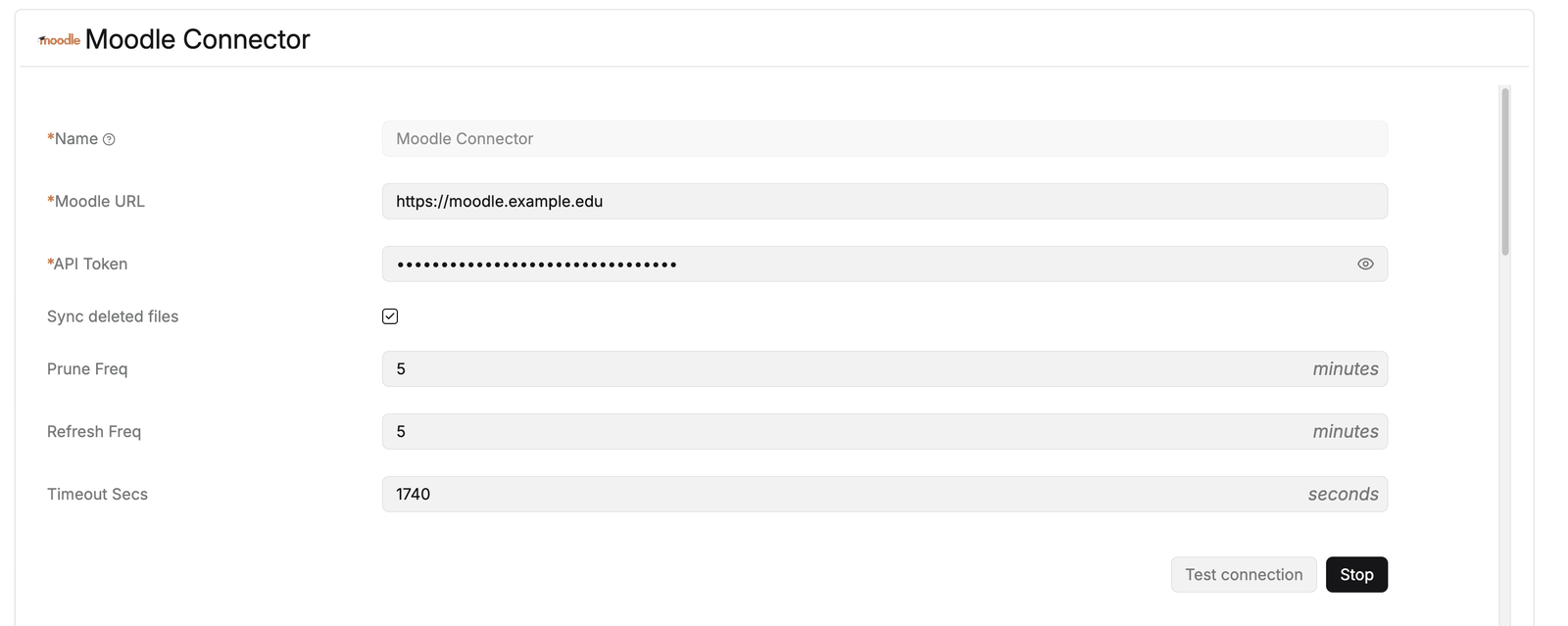 Point the connector at your Moodle base URL, paste the web-service token and set the sync cadence.
| Field | Value |
|---|---|
| Name | A label for this source, e.g. Moodle Connector. It appears in the sync log and on the knowledge base. |
| Moodle URL | The Moodle base URL (e.g. https://moodle.example.edu). |
| API Token | The web-service token from step 2. |
| Sync deleted files | Off by default. On, the connector also removes documents whose Moodle module has disappeared — see Sync behaviour. Ticking it reveals Prune Freq. |
| Prune Freq | Only shown when Sync deleted files is on: how often the stale-cleanup pass runs, in minutes. It is separate from the content sync, so cleanup can run at its own, usually slower, cadence. |
| Refresh Freq | How often the source re-syncs its content, in minutes. |
| Timeout Secs | Upper bound for a single sync run. Raise it for large sites; a run that exceeds it is cut off and retried on the next schedule. |
Test connection validates the token straight away (it calls core_webservice_get_site_info); a bad
token or missing web-service permissions are reported here — see Troubleshooting.
4. Bind it to a knowledge base and sync
Attach the data source to the knowledge base that should hold the Moodle content, then run the first sync. The initial run is a full load of all enrolled courses; after that RAGflow syncs incrementally; with Sync deleted files enabled it also removes documents for items deleted in Moodle. See Sync behaviour for the details and scheduling.
Once the knowledge base has parsed content, any RAGflow assistant can use it — and, if you run the Moodle plugins, so can they (see Using it with the Moodle RAGflow Suite).
Note: This documentation was created with the help of AI. Spotted an error, an omission, or something unclear? Please report it in the ragcon-docs GitHub repository so we can fix it.